Your AML/CTF Program is the cornerstone of your compliance framework. Once your ML/TF Risk Assessment has been completed and approved, you can access your tailored program through the Compliance menu.
Ready to access your program? Head to the Compliance menu (Shield if the menu is collapsed) then click on the AML Program menu item to view your tailored compliance program.
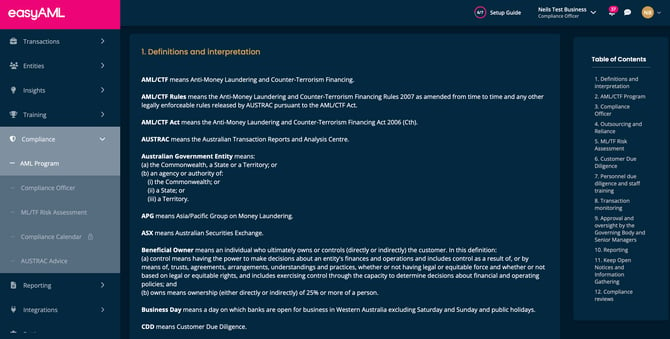
Your AML/CTF Program is a living document that outlines your business's approach to preventing money laundering and terrorism financing. It's built specifically for your business based on the risk assessment you completed, and must be reviewed annually to ensure it remains accurate and effective.
Important: Your program becomes available only after all required approvers have signed off on your ML/TF Risk Assessment. This is a major compliance milestone that unlocks your complete compliance framework.
Need to review your program? Schedule your annual review today to ensure continued compliance.
Troubleshooting
"I can't see the AML Program menu item"
- Verify you have appropriate access permissions
- Contact your Compliance Officer for access
- Check your role allows program viewing
- You may need to be assigned compliance responsibilities
"My program shows as not approved"
- Check if all designated approvers have signed off
- Navigate to ML/TF Risk Assessment to see approval status
- Contact pending approvers to expedite review
- Cannot access full program until all approvals received
"I need to update my program but can't find the option"
- You need Compliance Officer role to initiate updates
- Contact easyAML support if option is not visible
- Some updates require re-running the risk assessment
"Download button is greyed out"
- Check your subscription tier in Settings
- Download requires Professional tier or above
- Contact your account administrator about upgrading
- Alternative: take screenshots for immediate needs (not recommended for official use)
"My program doesn't reflect recent business changes"
- You need to complete a new risk assessment review
- Navigate to ML/TF Risk Assessment → New Assessment
- Answer questions based on current business state
- Submit for approval to generate updated program
"When is my annual review due?"
- Check your Compliance Calendar for scheduled date
- Look at program approval/last review date
- Add 12 months to determine deadline
- Set reminders 60 and 30 days before due date
"Who can approve program updates?"
- Only users with Compliance Officer, Compliance Officer 2IC, or Senior Management roles
- Same approvers selected during original risk assessment
- Cannot change approvers after risk assessment submission
- Need to invite appropriate users if approvers have changed roles
Questions about upgrading for download access? Contact easyAML support to discuss subscription tiers.
Go straight there: log in at app.easyaml.com and open Compliance > AML Program. Full walkthrough: How to Access and View AML Program Documentation.