EasyAML's risk assessment guide helps you build your tailored AML/CTF program based on the current AUSTRAC frameworks. updates may be required when sector specific guidance is released.
This process will take about 25 to 30 minutes to complete. You will be answering questions about your business, your clients and the associated risks.
You are able to save and resume at any time so don't feel you need to complete all the questions at once. There are no "wrong" answers - answer accurately and you'll be on your way to a working AML/CTF program which you can uplift overtime.
Important: Completing this assessment allows you to generate your AML/CTF Program, which is a big milestone in your compliance journey.
Step 1: access the risk assessment
Navigate to the Assessment:
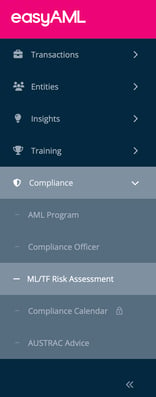
- Click "Compliance" from the left sidebar (Tip: If the menu is collapsed this is the Shield icon)
- Select "ML/TF Risk Assessment" (open directly)
- You'll see the main assessment page with the title "AML/CTF Compliance risk assessment"
- Click the "+ New Assessment" button to begin

Step 2: start your assessment
Key Information:
- Progress tracking: You can see exactly where you are in the process
- Save and resume: Click away at any time - your progress is automatically saved
- Time commitment: Each section takes approximately 5 minutes
- Total time: Plan for 25-30 minutes to complete all sections
Step 3: complete each section
The assessment is divided into several risk categories. The first section you'll encounter is "Business Structure" which contains 3 questions. From their you will move on to the "Customer Profile" and "Customer Risk" sections.
As you progress through the assessment, you'll complete questions across multiple risk areas:
Risk categories overview:
-
Customer Risk - Assessment of potential risks from different customer types
-
Service Risk - Evaluation of the services and products you provide
-
Delivery Risk - How you deliver services (in-person, online, etc.)
-
Jurisdiction Risk - Geographic risk assessment beyond the foreign jurisdictions question
-
Operational Risk - Internal controls and business practices
-
Environment Risk - External factors that may affect your risk profile
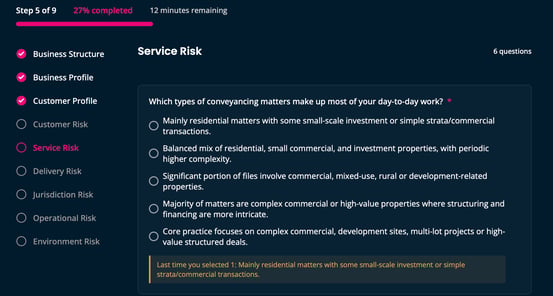
Each section is marked with a circle indicator on the left side - completed sections show a checkmark, and the current section is highlighted in pink.
Remember: There are no "wrong" answers. The goal is to accurately reflect your business so easyAML can create a tailored AML/CTF program for you.
Step 4: review and submit
Once you've completed all sections:
- Review your answers - you can navigate back through completed sections
- Ensure all required questions are answered
- Click "Submit" to finalize your assessment
After submission:
- Your selected approvers will receive notifications
- Your assessment status will change to "In progress" (awaiting approval)
- Once all approvers have approved, your status changes to "Complete"
- You can then view your AML/CTF Program - a major compliance milestone!
Tips for success
Before you start:
- Set aside 25-30 minutes of uninterrupted time (or plan to complete in multiple sessions)
- Gather relevant business information (entity details, service types, customer demographics)
- Identify who should approve your AML program
While completing:
- Answer questions based on your current business practices and the easyAML platform capabilities.
- Be thorough but don't overthink - you can update your assessment as your business evolves
- Use the save and resume feature if you need a break
- The progress bar shows how far you've come
After completion:
- Follow up with your selected approvers to ensure they review promptly
Troubleshooting
"I can't see the ML/TF Risk Assessment menu item"
- Check that you have the appropriate permissions
- Contact your Compliance Officer if you need access
- You may need to be assigned a compliance role
"I selected the wrong approver"
- If you haven't submitted yet, you can change your selection
- Once submitted, you cannot change approvers
- Contact easyAML support if you need to restart the assessment
"My approver says they can't approve"
- Verify they have the correct role (Compliance Officer, Compliance Officer 2IC, or Senior Management)
- Check they're looking in the right section (they'll receive a notification)
- They need to actively click the "Approve" button
"I want to update my assessment after completion"
- You can create a new assessment when your business circumstances change
- AUSTRAC requires you to review your risk assessment annually
- easyAML makes it easy to update based on new sector-specific guidance
"How often should I complete this assessment?"
- When significant business changes occur
- When AUSTRAC releases new guidance
- As part of your annual compliance review
- easyAML will notify you when updates are recommended
Ready to build your compliance program? Head to Compliance → ML/TF Risk Assessment → + New Assessment and take the first step today.
Need help understanding specific questions? Contact easyAML support for guidance tailored to your business type.
Go straight there: log in at app.easyaml.com and open Compliance > AML Program to start or resume your assessment. Walkthroughs: Accessing Your ML/TF Risk Assessment and How To Create, View And Export ML/TF Risk Assessments.